> ## Documentation Index
> Fetch the complete documentation index at: https://otpless.com/docs/llms.txt
> Use this file to discover all available pages before exploring further.
# Auth Terminated CallBack
```kotlin theme={null}
private fun onOtplessResponse(response: OtplessResponse) {
OtplessSDK.commit(response)
when (response.responseType) {
ResponseTypes.SDK_READY -> {
// SDK has been initialized successfully, you may enable your continue button or proceed with user authentication.
}
ResponseTypes.FAILED -> {
// Notify that the initialization failed
if (response.statusCode == 5003) {
// SDK initialization failed, please try to initialize the SDK again
}
}
ResponseTypes.INITIATE -> {
// notify that authentication has been initiated
if (response.statusCode != 200) {
handleInitiateError(response);
} else {
val authType = response.response?.optString("authType") // This is the authentication type
if (authType == "OTP") {
// Take user to OTP verification screen
} else if (authType == "SILENT_AUTH") {
// Handle Silent Authentication initiation by showing loading status for SNA flow.
}
}
}
ResponseTypes.OTP_AUTO_READ -> {
val otp = response.response?.optString("otp")
if (!otp.isNullOrBlank()) {
// Autofill the OTP in your TextField/EditText
}
}
ResponseTypes.VERIFY -> {
// notify that verification has failed.
if (response.response?.optString("authType") == "SILENT_AUTH") {
if (response.statusCode == 9106) {
// Silent Authentication and all fallback authentication methods in SmartAuth have failed.
// The transaction cannot proceed further.
// The transaction cannot proceed further. Handle the scenario to gracefully exit the authentication flow
} else {
// Silent Authentication failed. If SmartAuth is enabled, the INITIATE response will include the next available authentication method configured in the dashboard.
}
} else {
handleVerifyError(response)
}
}
ResponseTypes.DELIVERY_STATUS -> {
// This function is called when delivery is successful for your authType.
val authType = response.response?.optString("authType")
// It is the authentication type (OTP, MAGICLINK, OTP_LINK) for which the delivery status is being sent
val deliveryChannel = response.response?.optString("deliveryChannel")
// It is the delivery channel (SMS, WHATSAPP, etc) on which the authType has been delivered
}
ResponseTypes.FALLBACK_TRIGGERED -> {
// A fallback occurs when an OTP delivery attempt on one channel fails,
// and the system automatically retries via the subsequent channel selected on Otpless Dashboard.
// For example, if a merchant opts for SmartAuth with primary channal as WhatsApp and secondary channel as SMS,
// in that case, if OTP delivery on WhatsApp fails, the system will automatically retry via SMS.
// The response will contain the deliveryChannel to which the OTP has been sent.
if (response.response != null) {
val newDeliveryChannel = response.response.optString("deliveryChannel"); // This is the deliveryChannel to which the OTP has been sent
}
}
ResponseTypes.ONETAP -> {
// final response with token
val token = response.response?.optJSONObject("data")?.optString("token")
if (!token.isNullOrBlank()) {
// Process token and proceed.
}
}
ResponseTypes.AUTH_TERMINATED -> {
// This state indicates that the authentication process was terminated due to a Failure.
}
}
}
```
```swift theme={null}
func onResponse(_ response: OtplessBM.OtplessResponse) {
Otpless.shared.commitOtplessResponse(response)
switch response.responseType {
case .SDK_READY:
// Notify that SDK has been initialized successfully
print("SDK has been initialized successfully, you may enable your continue button or proceed with user authentication.")
case .FAILED:
// Notify that the initialization has failed
if response.statusCode == 5003 {
print("SDK initialization failed, please try to initialize the SDK again")
}
case .INITIATE:
// Notify that authentication has been initiated
if response.statusCode == 200 {
print("Authentication initiated")
let authType = response.response?["authType"] as? String
// This is the authentication type
if authType == "OTP" {
// Take user to OTP verification screen
} else if authType == "SILENT_AUTH" {
// Handle Silent Authentication initiation by showing loading status for SNA flow.
}
} else {
handleInitiateError(response)
}
case .VERIFY:
// Notify that verification has failed
if response.response?["authType"] as? String == "SILENT_AUTH" {
if response.statusCode == 9106 {
// Silent Authentication and all fallback authentication methods in SmartAuth have failed.
// The transaction cannot proceed further.
// Handle the scenario to gracefully exit the authentication flow
} else {
// Silent Authentication failed. If SmartAuth is enabled,
// the INITIATE response will include the next available authentication
// method configured in the dashboard.
}
} else if response.response?["authType"] as? String == "OTP" {
handleVerifyError(response)
}
case .FALLBACK_TRIGGERED:
// A fallback occurs when an OTP delivery attempt on one channel fails,
// and the system automatically retries via the subsequent channel selected on Otpless Dashboard.
// For example, if a merchant opts for SmartAuth with primary channal as WhatsApp and secondary channel as SMS,
// in that case, if OTP delivery on WhatsApp fails, the system will automatically retry via SMS.
// The response will contain the deliveryChannel to which the OTP has been sent.
let newDeliveryChannel = response.response?["deliveryChannel"] as? String // This is the deliveryChannel to which the OTP has been sent
print("Fallback authentication triggered")
case .DELIVERY_STATUS:
// This function is called when delivery is successful for your authType.
let authType = response.response?["authType"] as? String
// It is the authentication type (OTP, MAGICLINK, OTP_LINK) for which the delivery status is being sent
let deliveryChannel = response.response?["deliveryChannel"] as? String
// It is the delivery channel (SMS, WHATSAPP, etc) on which the authType has been delivered
case .ONETAP:
// Final response with token
if response.statusCode == 200 {
if let data = response.response?["data"] as? [String: Any],
let token = data["token"] as? String, !token.isEmpty {
// Process token and proceed to verify the token on your backend.
print("Received token: \(token)")
} else {
print("Token not received")
}
} else {
print("Token verification failed")
}
}
case .AUTH_TERMINATED:
// This state indicates that the authentication process was terminated due to a Failure.
}
```
```dart theme={null}
void onOtplessResponse(dynamic result) {
_otplessHeadlessPlugin.commitResponse(result);
final responseType = result['responseType'];
switch (responseType) {
case "SDK_READY":
debugPrint("SDK is ready");
break;
case "FAILED":
debugPrint("SDK initialization failed");
// Handle SDK initialization failure
break;
case "INITIATE":
if (result["statusCode"] == 200) {
debugPrint("Headless authentication initiated");
final authType = result["response"]["authType"]; // This is the authentication type
if (authType == "OTP") {
// Take user to OTP verification screen
} else if (authType == "SILENT_AUTH") {
// Handle Silent Authentication initiation by showing
// loading status for SNA flow.
}
} else {
// Handle initiation error.
// To handle initiation error response, please refer to the error handling section.
if (Platform.isAndroid) {
handleInitiateErrorAndroid(result["response"]);
} else if (Platform.isIOS) {
handleInitiateErrorIOS(result["response"]);
}
}
break;
case "OTP_AUTO_READ":
// OTP_AUTO_READ is triggered only in ANDROID devices for WhatsApp and SMS.
final otp = result["response"]["otp"];
debugPrint("OTP Received: $otp");
break;
case "VERIFY":
final authType = result["response"]["authType"];
if (authType == "SILENT_AUTH") {
if (result["statusCode"] == 9106) {
// Silent Authentication and all fallback authentication methods in SmartAuth have failed.
// The transaction cannot proceed further.
// Handle the scenario to gracefully exit the authentication flow
} else {
// Silent Authentication failed.
// If SmartAuth is enabled, the INITIATE response
// will include the next available authentication method configured in the dashboard.
}
} else {
// To handle verification failed response, please refer to the error handling section.
if (Platform.isAndroid) {
handleVerifyErrorAndroid(result["response"]);
} else if (Platform.isIOS) {
handleVerifyErrorIOS(result["response"]);
}
}
break;
case "DELIVERY_STATUS":
// This function is called when delivery is successful for your authType.
final authType = result["response"]["authType"];
// It is the authentication type (OTP, MAGICLINK, OTP_LINK) for which the delivery status is being sent
final deliveryChannel = result["response"]["deliveryChannel"];
// It is the delivery channel (SMS, WHATSAPP, etc) on which the authType has been delivered
break;
case "ONETAP":
final token = result["response"]["token"];
if (token != null) {
debugPrint("OneTap Data: $token");
// Process token and proceed
}
break;
case "FALLBACK_TRIGGERED":
// A fallback occurs when an OTP delivery attempt on one channel fails,
// and the system automatically retries via the subsequent channel selected on Otpless Dashboard.
// For example, if a merchant opts for SmartAuth with primary channal as WhatsApp and secondary channel as SMS,
// in that case, if OTP delivery on WhatsApp fails, the system will automatically retry via SMS.
// The response will contain the deliveryChannel to which the OTP has been sent.
final newDeliveryChannel = result["response"]["deliveryChannel"];
if (newDeliveryChannel != null) {
// This is the deliveryChannel to which the OTP has been sent
}
break;
case "AUTH_TERMINATED":
// This state indicates that the authentication process was terminated due to a Failure.
break;
default:
debugPrint("Unknown response type: $responseType");
break;
}
}
```
```javascript theme={null}
const onHeadlessResult = (result: any) => {
headlessModule.commitResponse(result);
const responseType = result.responseType;
switch (responseType) {
case "SDK_READY": {
// Notify that SDK is ready
console.log("SDK is ready");
break;
}
case "FAILED": {
console.log("SDK initialization failed");
// Handle SDK initialization failure
break;
}
case "INITIATE": {
// Notify that headless authentication has been initiated
if (result.statusCode == 200) {
console.log("Headless authentication initiated");
const authType = result.response.authType; // This is the authentication type
if (authType === "OTP") {
// Take user to OTP verification screen
} else if (authType === "SILENT_AUTH") {
// Handle Silent Authentication initiation by showing
// loading status for SNA flow.
}
} else {
// Handle initiation error.
// To handle initiation error response, please refer to the error handling section.
if (Platform.OS === 'ios') {
handleInitiateErrorIOS(result.response);
} else if (Platform.OS === 'android') {
handleInitiateErrorAndroid(result.response);
}
}
break;
}
case "OTP_AUTO_READ": {
// OTP_AUTO_READ is triggered only in Android devices for WhatsApp and SMS.
if (Platform.OS === "android") {
const otp = result.response.otp;
console.log(`OTP Received: ${otp}`);
}
break;
}
case "VERIFY": {
// notify that verification has failed.
if (result.response.authType == "SILENT_AUTH") {
if (result.statusCode == 9106) {
// Silent Authentication and all fallback authentication methods in SmartAuth have failed.
// The transaction cannot proceed further.
// Handle the scenario to gracefully exit the authentication flow
} else {
// Silent Authentication failed.
// If SmartAuth is enabled, the INITIATE response
// will include the next available authentication method configured in the dashboard.
}
} else {
// To handle verification failed response, please refer to the error handling section.
if (Platform.OS === 'ios') {
handleVerifyErrorIOS(result.response);
} else if (Platform.OS === 'android') {
handleVerifyErrorAndroid(result.response);
}
}
break;
}
case "DELIVERY_STATUS": {
// This function is called when delivery is successful for your authType.
const authType = result.response.authType;
// It is the authentication type (OTP, MAGICLINK, OTP_LINK) for which the delivery status is being sent
const deliveryChannel = result.response.deliveryChannel;
// It is the delivery channel (SMS, WHATSAPP, etc) on which the authType has been delivered
break;
}
case "ONETAP": {
const token = result.response.token;
if (token != null) {
console.log(`OneTap Data: ${token}`);
// Process token and proceed.
}
break;
}
case "FALLBACK_TRIGGERED": {
// A fallback occurs when an OTP delivery attempt on one channel fails,
// and the system automatically retries via the subsequent channel selected on Otpless Dashboard.
// For example, if a merchant opts for SmartAuth with primary channal as WhatsApp and secondary channel as SMS,
// in that case, if OTP delivery on WhatsApp fails, the system will automatically retry via SMS.
// The response will contain the deliveryChannel to which the OTP has been sent.
if (response.response.deliveryChannel != null) {
const newDeliveryChannel = response.response.deliveryChannel
// This is the deliveryChannel to which the OTP has been sent
}
break;
}
case "AUTH_TERMINATED": {
// This state indicates that the authentication process was terminated due to a Failure.
break;
}
default: {
console.warn(`Unknown response type: ${responseType}`);
break;
}
}
};
```
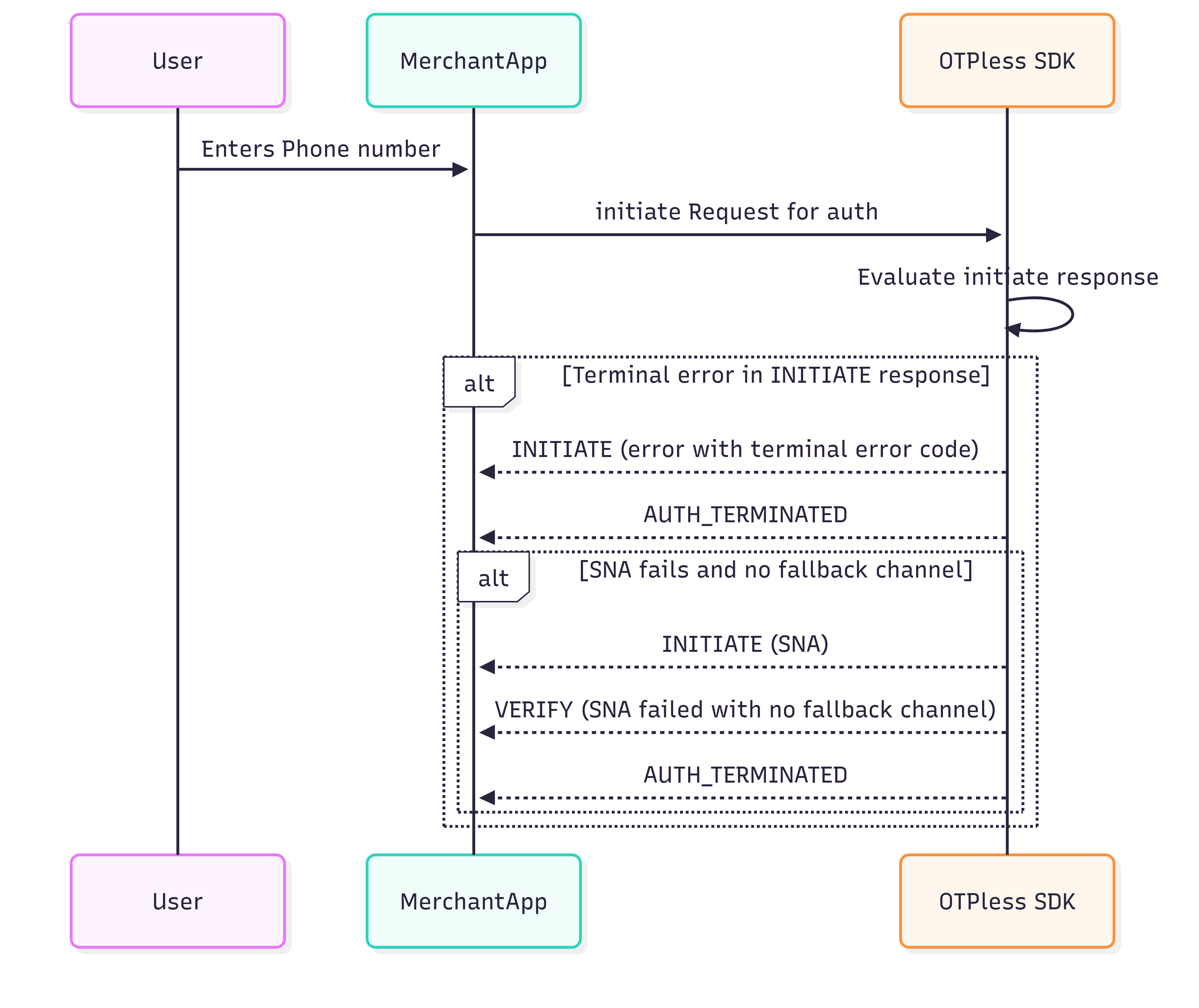
## AUTH\_TERMINATED
This state indicates that the authentication process was forcefully stopped
due to an expected failure during the flow.
## Auth Terminated Flow
This sequence represents the OTPless SDK authentication flow. After the user enters their phone number, the Merchant App initiates the request. The SDK evaluates the response, and if a terminal error occurs during initiation—or if SNA fails with no fallback—it returns AUTH\_TERMINATED.